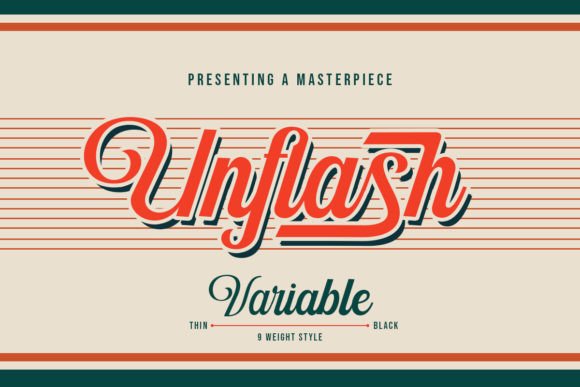
Unflash: A Script Font That Adds Modern Warmth to Web Design
I was refreshing a client's website for a small, modern bakery—a redesign focused on warmth and craft. The existing layout felt a bit sterile, and the goal was to introduce a more artisanal, personal touch into the digital experience. The hero section was my starting point. I needed a headline font that felt crafted, not cold; sophisticated, but inviting. That's when I opened my typeface library and gave Unflash Script a try. Dropping "Fresh From Our Kitchen" into the design mockup instantly shifted the mood. The balanced curves and elegant flow of this script font transformed a simple headline into a welcoming gesture, perfectly setting the tone for the entire site.
What Makes Unflash Stand Out on a Screen
Unflash isn't just another decorative script. It's a carefully crafted font family with a distinct personality that translates beautifully to digital spaces. Its charm lies in its balance. The curves are fluid and graceful, but the letterforms maintain a consistent weight and clarity that prevents them from looking messy or overly casual on a screen. This gives Unflash a modern typography feel—it’s a script font that works for contemporary brands seeking an elevated, yet approachable, digital identity. The mood it creates is one of creative confidence: friendly but professional, artistic but readable.
Perfect Applications for Websites and Digital Products
From that bakery project, I started testing Unflash across other digital design scenarios. Its strengths became quickly apparent in specific areas of web design and digital content creation.
- Hero Headlines & Landing Page Titles: This is where Unflash truly shines. Its personality captures attention immediately, making it ideal for key messages on portfolio homepages, product landing pages, or campaign pages. It tells a user, "This space is creative and thoughtfully made."
- Branded Call-to-Action Text: Using Unflash on a primary button, like "Join the Course" or "Explore Our Portfolio," can add a unique signature touch without sacrificing urgency. It’s best for short, impactful phrases.
- Section Headings & Blog Post Titles: For websites where you want to break up long content with visual interest, Unflash works well for H2 or H3 headings in blogs or editorial-style sites, especially for creative industries.
- Logo Text & Site Identity: For many small businesses and boutique online stores, a website logo might be text-based. Unflash offers a ready-made, professional logo design solution that can be used directly in the header.
- Digital Ad Graphics & Social Media Banners: The font’s strong personality makes it effective for key text in promotional graphics, email header images, or Instagram story overlays, where you need quick visual appeal.
Readability and Responsive Design Considerations
Any display font needs to perform under real-world browsing conditions. When testing Unflash in responsive layouts, a few practical points emerged. On desktop screens, its elegance is fully realized, and it remains readable even at moderately smaller sizes within hero areas. On mobile, however, you need to be mindful. For headlines, ensure a sufficient font size (I'd recommend not going below 28px on mobile viewports) to maintain the integrity of its curves and prevent the letters from becoming a blurry, tangled script. It performs well over both light and dark backgrounds, provided there's strong contrast. For image overlays, a subtle drop shadow or ensuring the background image area isn't too busy can help legibility.
Crucially, Unflash is a display font. Its intended use is for short phrases, names, and titles. It is not suitable for body copy, navigation menu items, form labels, or any dense textual interface elements. Using it for long paragraphs would severely harm readability and user experience. For those functional elements, you must pair it with a highly legible web font.
Strategic Font Pairing for a Cohesive Digital Brand
A great script font like Unflash needs a strong supporting cast. For web design, the pairing is critical for establishing clear visual hierarchy and ensuring usability. My go-to approach is to pair Unflash with a clean, simple sans serif font for all body text, UI elements, and longer descriptions. A font like Inter, Open Sans, or Poppins creates a perfect modern contrast: the personality of Unflash draws attention, while the neutral sans serif provides effortless reading. For a more editorial or luxury feel, a refined serif font could also work as the body font. The key is to let Unflash be the decorative accent—the star of the show for key moments—and use a more utilitarian font for everything else. This pairing builds a cohesive and professional brand identity across the site.
Where Unflash Might Not Fit Your Project
Being honest about a font's limitations is part of a professional review. While Unflash is a fantastic creative font for many digital applications, there are web contexts where I would avoid it. It is not the right choice for data-heavy SaaS dashboards, technical documentation sites, or any interface where accessibility and dense information consumption are primary concerns. Its decorative nature can be a barrier in those scenarios. Additionally, if your website's content is primarily long-form articles with minimal visual branding, a more traditional serif or sans serif for headlines might be a safer bet for consistency. Unflash is a tool for branding and emotional connection, not for pure functional communication.
Essential Technical Checks for Web Use
Before committing to Unflash for a client's website or your own digital product, do your due diligence on the technical specs. First, verify the commercial font licensing—ensure your use (personal, client work, digital product templates) is covered. For web use, check if webfont formats (like WOFF2) are included or readily available, as this is crucial for fast, proper rendering on browsers. Investigate the font family's included styles and weights; having at least a regular and a bold weight can add versatility for different headline hierarchies. Look for OpenType features like alternates or ligatures, which can add extra custom flair to logos or special titles. Also, confirm multilingual support if your project requires it. These practical checks ensure the font not only looks good in your mockup but performs reliably in the live, responsive environment.
Ultimately, Unflash Script is a valuable addition to a web designer's toolkit for projects that require a blend of modern aesthetics and human touch. It bridges the gap between digital precision and handmade charm, allowing you to inject personality into hero sections, landing pages, and key branded elements without sacrificing professional polish. When used strategically—for display purposes, with mindful responsive sizing, and paired with a clean supporting font—it can elevate a website's emotional appeal and help an online brand tell its story more beautifully.